Modeling and Visualizing multiple realizations
You can create properties and property models with multiple realizations for facies, rock properties, permeability and saturation. Depending on the desired output property, multiple realizations can be generated in the Property Calculator, Property Tool, Facies Modeling, Rock Property Modeling, Permeability Property Modeling and Saturation Property Modeling.
Modeling multiple realizations
If the input properties or property models consist of multiple realizations, the output properties or property models are also modeled with multiple realizations. The total number of realizations in the output property or property model depends on the modeling workflow, and the number of realizations for the individual input properties.
For the Facies Modeling workflow, you can specify the number of realizations for the property model in the last step before you run the model. If you are using a facies model with multiple realizations in the Rock Property Modeling workflow, the same number of realizations are created for the rock property as specified for the facies model. For implementing multiple realizations in the Permeability Property Modeling, Saturation Property Modeling, Volumetrics, and property modeling using the Property Tool, all the related input properties must have the same number of realizations. An error message is displayed if the input properties have different number of realizations.
If you want to model multiple realizations in the Property Calculator, the input property or the property model that has the least number of realizations, but more than a single realization, is considered as the least common number of realizations for the output property. In the image below, final output property has n+1 realizations that is inherited from ‘Prop-2’ property. ‘Prop-1’ is common for all the realizations since it is represented by a single realization. The additional realizations in ‘Prop-3’ and ‘Prop-4’ are handled as exceptions and it is not modeled for the output property.
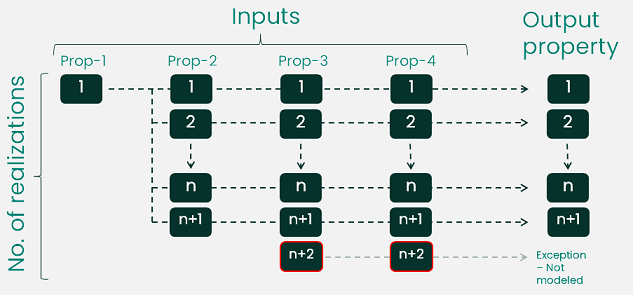
Generic description for modeling properties with multiple realizations. click to enlarge
Visualizing realizations
If your grid property or the property model has multiple realizations, select the property in JewelExplorer and go to Property Inspector  (Panes > Inspector) to change the property realization information displayed in your view. Change the value of the Current step to the realization number (see the image below) that you want to visualize in your view.
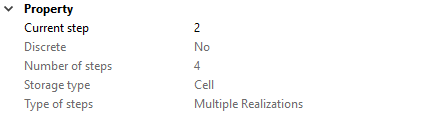
Changing the realization number in the Property Inspector click to enlarge